
Funcții customizate cu ajutorul Pionier AI
Pionier AI poate genera funcții customizate pornind de la cerințe formulate în limbaj natural: câmpuri calculate, BI, aprobări blocante și alerte automate.
- minute, nu zile
- răspuns la cerințe personalizate
- fără SQL manual
- funcții custom din limbaj natural
- 4 exemple reale
- factură, BI, aprobare, alertă e-mail
Ce este Pionier AI ?
Pionier AI este asistentul inteligent al ecosistemului Nexus ERP, o platformă web de tip chatbot, bazată pe inteligență artificială, dezvoltată de Nexus Media și specializată pentru mediul de afaceri din România. Scopul său este reducerea timpului de răspuns la solicitările personalizate ale utilizatorilor: de la zile sau săptămâni, la câteva minute. Asistentul oferă suport tehnic pentru aplicațiile Nexus pe baza documentației oficiale, răspunsuri pe teme de legislație economică și contabilitate, precum și sprijin în analize și crearea de fișiere.
Studiul de caz de față se concentrează pe 4 scenarii concrete din activitatea zilnică a unui administrator Nexus ERP: utilizatorii vin constant cu cerințe de tipul „vreau o coloană nouă în raportul x" sau „anunțați-mă pe e-mail când scade stocul". Fiecare dintre aceste cerințe se rezolvă printr-o funcție customizată, iar scrierea ei necesită timp, cunoștințe SQL și familiaritate cu structura bazei de date Nexus. Vom urmări pas cu pas cum administratorul folosește Pionier AI ca partener tehnic în acest proces: de la cerința formulată în limbaj obișnuit de către utilizator, până la funcția custom implementată în sistem, câmpuri calculate, aprobări blocante, alerte automate și rapoarte personalizate.
Cum lucrăm cu Pionier AI
Pionier AI este construit pe baza unui model lingvistic (LLM) și, ca atare, este nondeterministic. Pentru aceeași cerință, formulată identic, poate genera răspunsuri diferite de la o sesiune la alta (formule echivalente scrise altfel, alt stil de cod, alte detalii), spre deosebire de un program clasic care dă întotdeauna exact același rezultat. În consecință, exemplele din acest studiu de caz sunt ilustrative, ele arată modul de lucru și tipul de rezultat la care ne putem aștepta, dar nu garantează rezultate identice.
Modul de lucru este iterativ. Pionier AI nu este, de regulă, un schimb dintr-o singură întrebare și un singur răspuns. Cel mai bun mod de lucru este unul iterativ, ca într-o discuție:
Dacă răspunsul nu este corect sau funcția dă erori, trebuie să precizăm concret ce nu funcționează. Putem indica mesajul de eroare exact, atașa un screenshot cu eroarea sau cu rezultatul greșit și precizări suplimentare pentru a obține rezultatul dorit.
Cu cât cerința este mai clară, mai completă și mai exactă, cu atât rezultatul este mai bun. Un prompt vag produce un răspuns generic, un prompt care precizează modulul, raportul/documentul, câmpurile, condițiile și formatul așteptat produce un rezultat mult mai corect.
Notă metodologică aplicabilă pentru toate scenariile:
Precizează contextul exact în prompt: modulul în care te afli, raportul/documentul vizat și tipul de funcție dorit (câmp calculat / avertizare / aprobare blocantă / raport).
Cere verificarea câmpurilor: adaugă în prompt „verifică câmpurile existente, cu numele exacte". Pionier AI poate confirma denumirile reale ale câmpurilor înainte de a genera formula. Un adaos opțional care crește substanțial viteza și acuratețea răspunsului este oferirea câmpurilor necesare în prompt fie extrase în format text, fie sub formă de capturi de ecran
Testare înainte de producție: validează funcția pe un document de probă, nu direct pe documente reale.
Pionier AI poate face greșeli: verifică întotdeauna răspunsurile primite înainte de a le pune în uz.
Introducerea firmei SC EXEMPLU SRL
SC EXEMPLU SRL este un distribuitor de materiale electrice și echipamente electrocasnice. Firma operează un depozit central, două magazine proprii (vânzare cu bon fiscal) și un canal B2B prin care livrează către electricieni autorizați și firme de instalații.
SC EXEMPLU SRL folosește Nexus ERP pentru întreaga activitate operațională și contabilă. Pe măsură ce activitatea a crescut, utilizatorii au început să ceară adaptări: coloane noi în rapoarte, reguli de validare, alerte, rapoarte. În loc să apeleze de fiecare dată la consultanță externă, administratorul de sistem al firmei folosește Pionier AI pentru a genera aceste funcții customizate.
Scenariul 1 - Câmp calculat: denumire + cod produs pe factură
Cerința responsabilului cu facturarea: „Mai mulți clienți ne-au cerut ca pe factură să apară și codul de produs, pentru că ei fac recepția mărfii după SKU. Se poate afișa sub denumirea fiecărui produs?”
Prompt pentru Pionier AI: Mă aflu în modulul Ieșiri - Facturi clienți și vreau să modific factura de client astfel încât să apară sub denumirea produsului și codul sku. Am intrat în meniul Rapoarte - Configurare rapoarte și am selectat raportul „Formulare Facturi clienți”, am intrat în meniul pentru a adăuga un câmp calculat. Generează-mi formula pentru câmpul calculat.
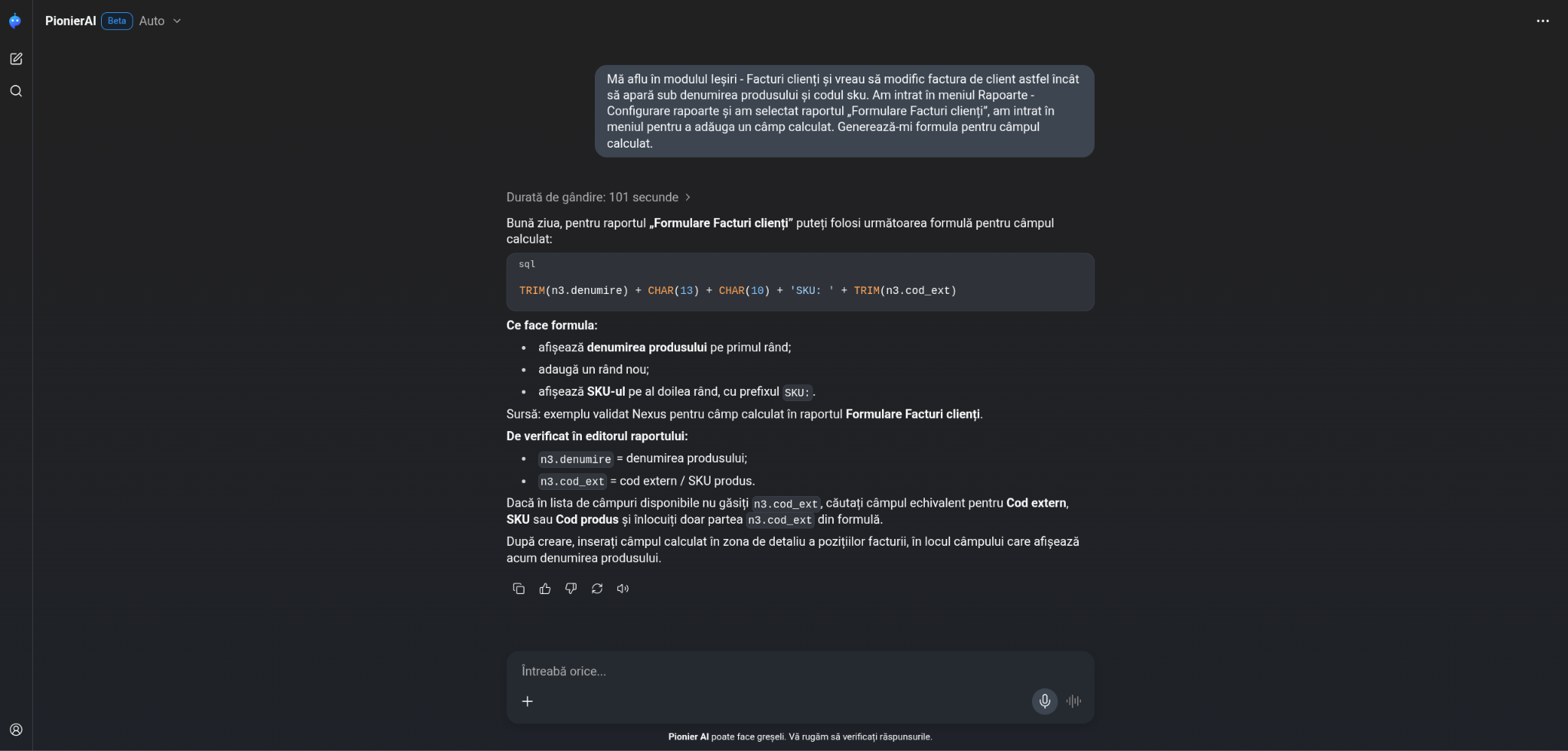
Apoi pe baza formulei oferite de Pionier AI putem crea câmpul calculat necesar.
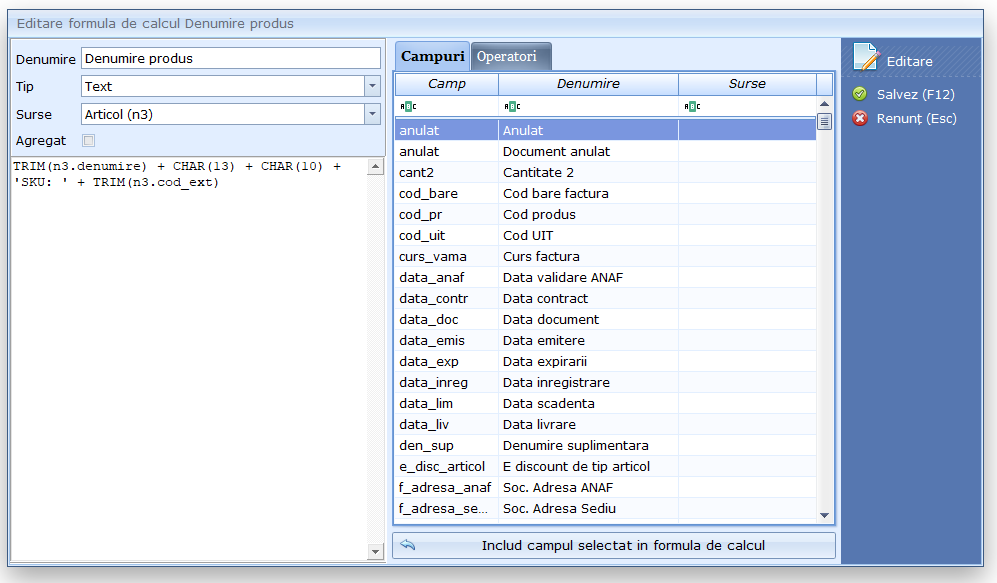
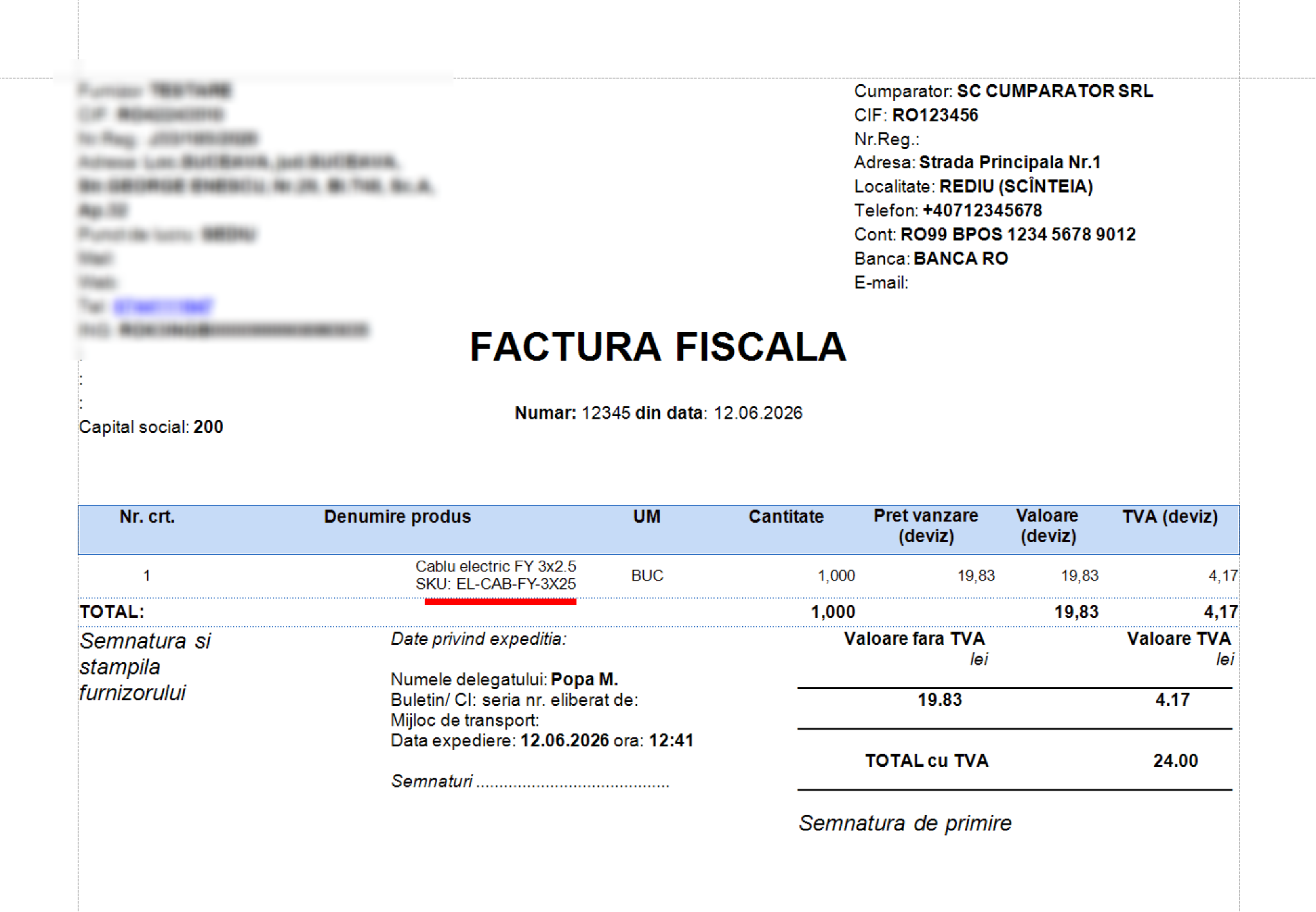
Scenariul 2 - Câmpuri calculate în BI: indicatori de vânzări
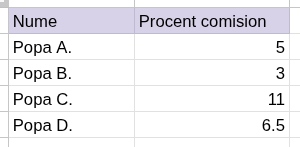
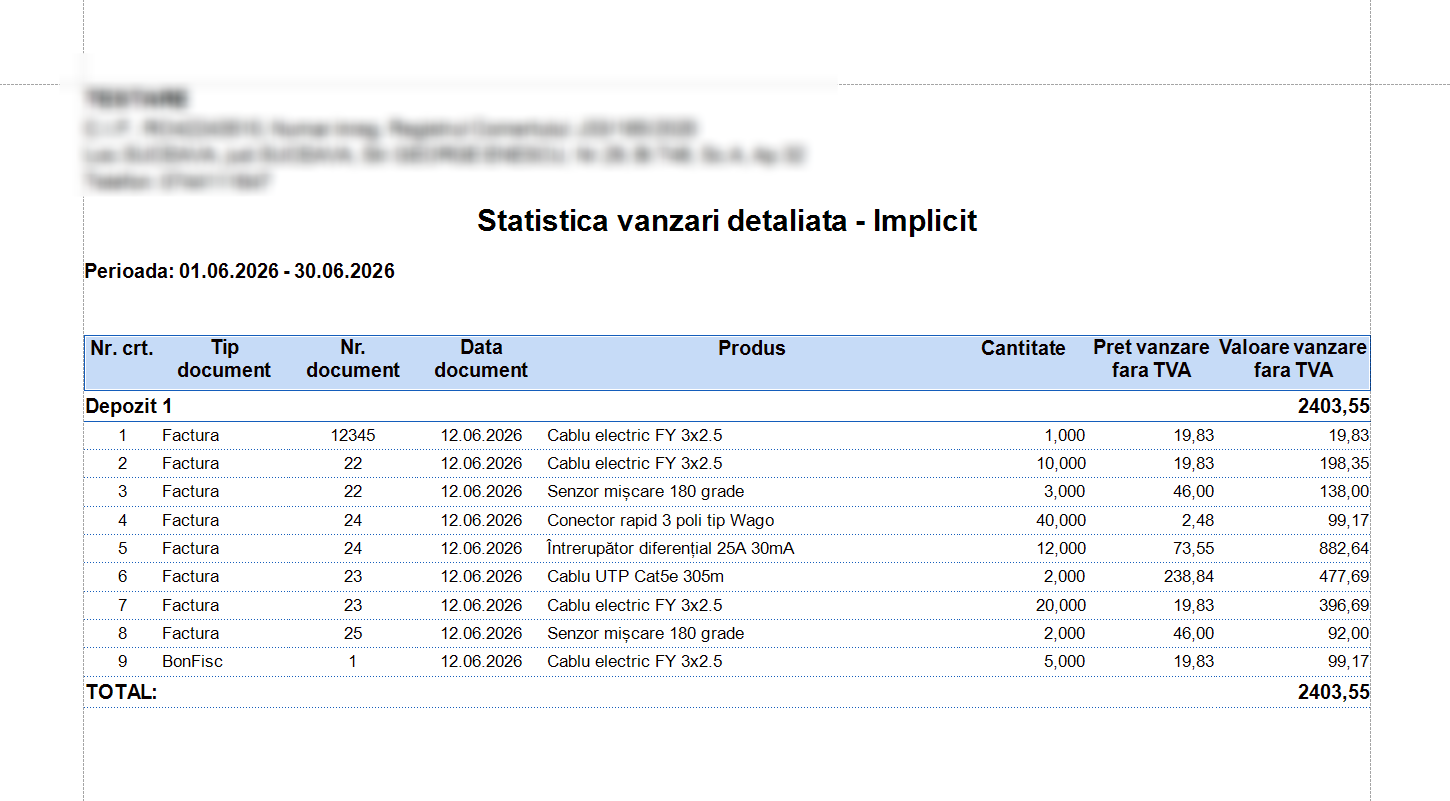
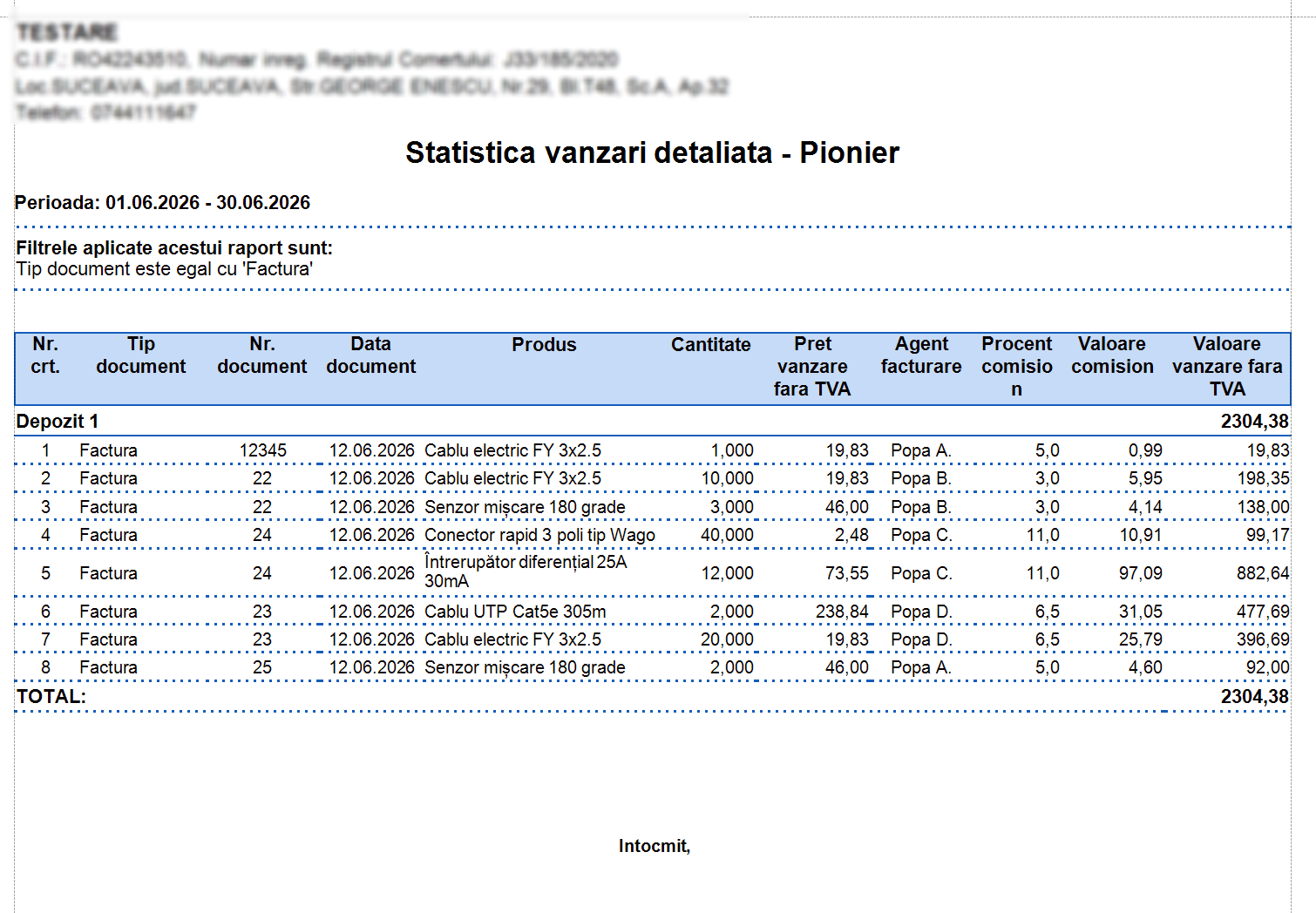
Cerința managerului de vânzări: „În statistică de produse vândute vreau să văd comisionul agenților calculat pe baza fișierului Excel atașat comisioane_agenti.xlsx, calculat din valoarea netă după discount.”
Raport statistică vânzări detaliată implicit oferit de Nexus ERP
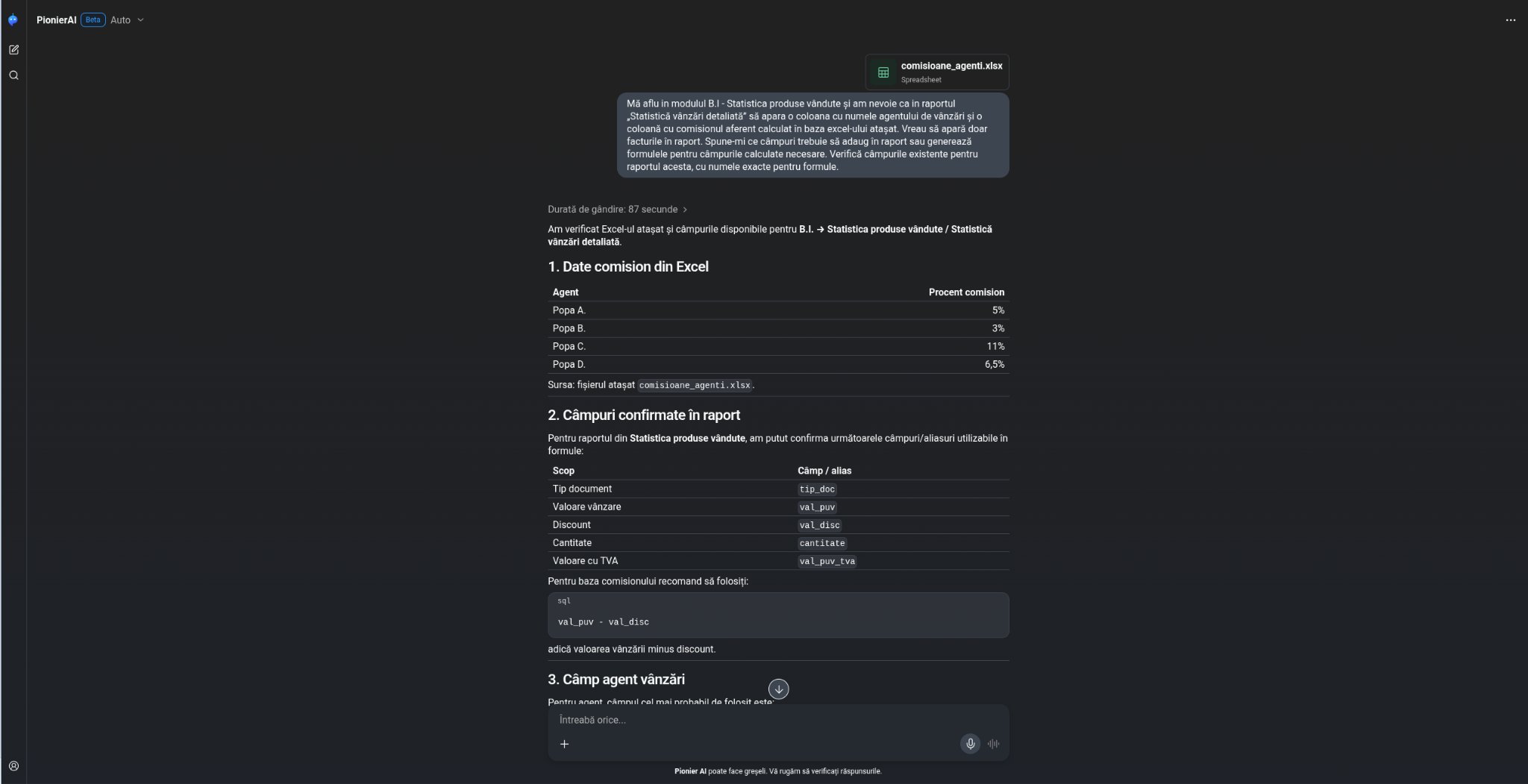
Prompt pentru Pionier AI: Mă aflu in modulul B.I - Statistica produse vândute și am nevoie ca în raportul „Statistică vânzări detaliată” să apara o coloană cu numele agentului de vânzări și o coloană cu comisionul aferent calculat în baza excel-ului atașat. Vreau să apară doar facturile în raport. Spune-mi ce câmpuri trebuie să adaug în raport sau generează formulele pentru ce câmpuri calculate trebuie să creez. Verifică câmpurile existente pentru raportul acesta, cu numele exacte pentru formule.
Raport statistică vânzări detaliată obținut urmând instrucțiunile oferite de Pionier AI:
Scenariul 3 - Aprobare blocantă validare facturi mari doar de responsabili
Cerința directorului general: „Agenții pot emite și valida facturi mici fără probleme, dar nu vreau ca facturile peste 10.000 lei cu TVA să poată fi validate de oricine, acele facturi trebuie să le valideze doar șeful de vânzări sau directorul, înainte să plece la client. ( Vlad sau Andrei )"
Prompt pentru Pionier AI: Mă aflu în modulul Ieșiri - Facturi clienți și vreau să creez o aprobare blocantă ca doar utilizatorii Vlad și Andrei să poată valida facturi mai mari de 10.000 lei cu TVA. Verifică câmpurile existente și generează funcția customizată pentru aceasta aprobare blocantă.
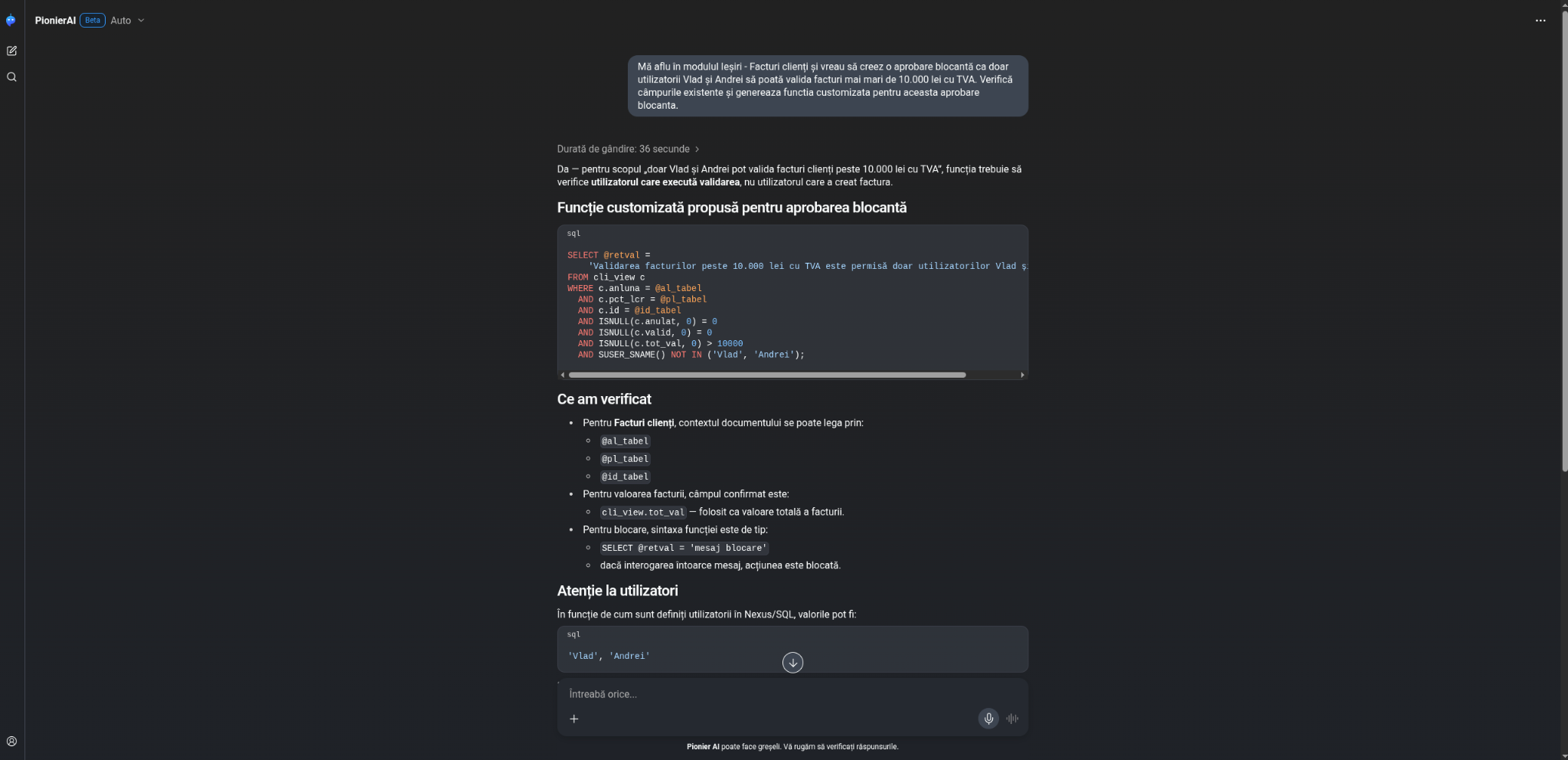
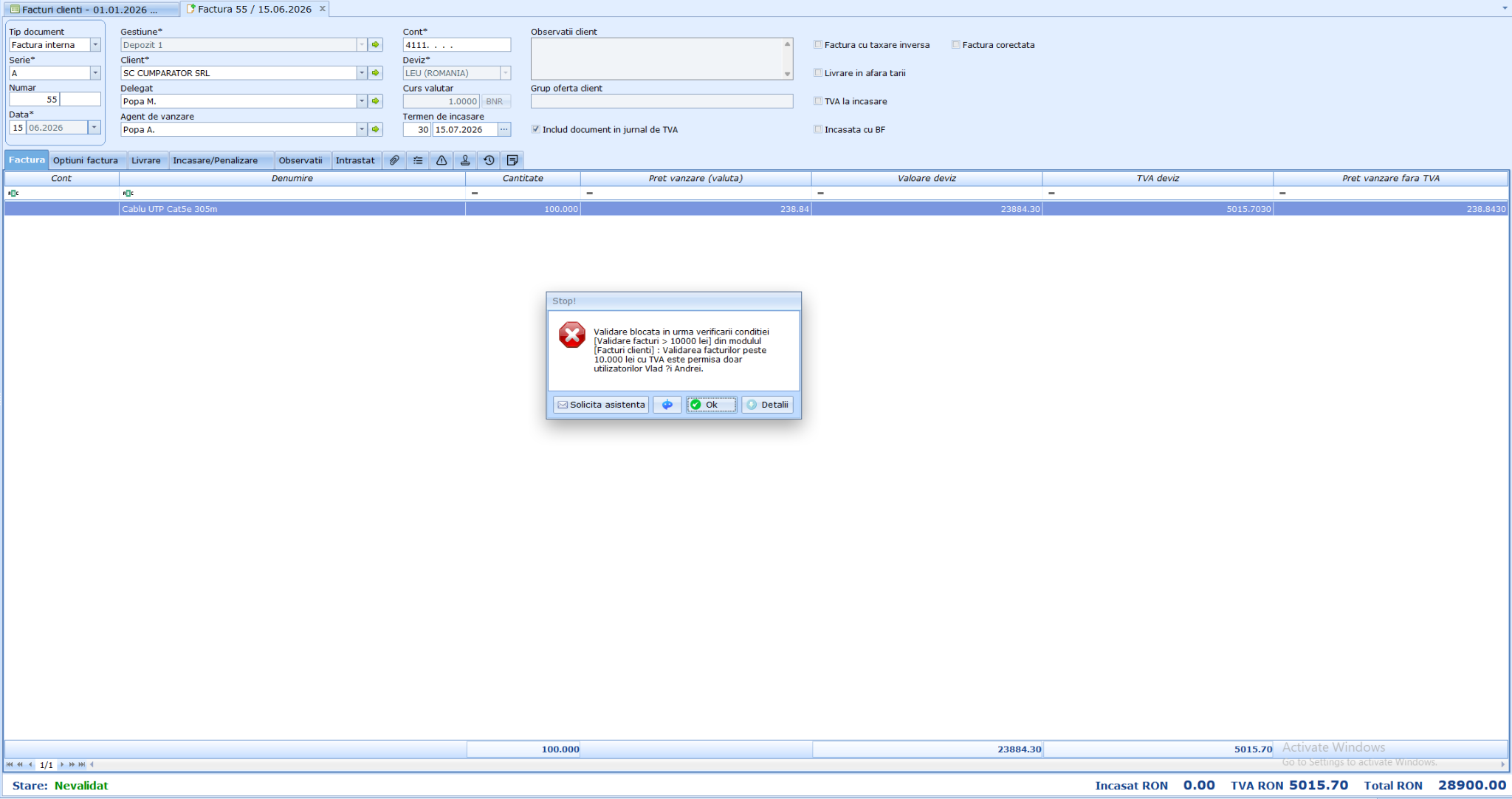
Avertizare rezultată în urma aplicării aprobării blocante generată de Pionier AI
Scenariul 4 - Alertă programată pe e-mail Comandă client cu termen de livrare scurt
Cerința managerului departamentului de logistică: „Când intră o comandă cu data de livrare la mai puțin de 3 zile, vreau alertă pe mail-ul depozitului, ca să o prioritizăm."
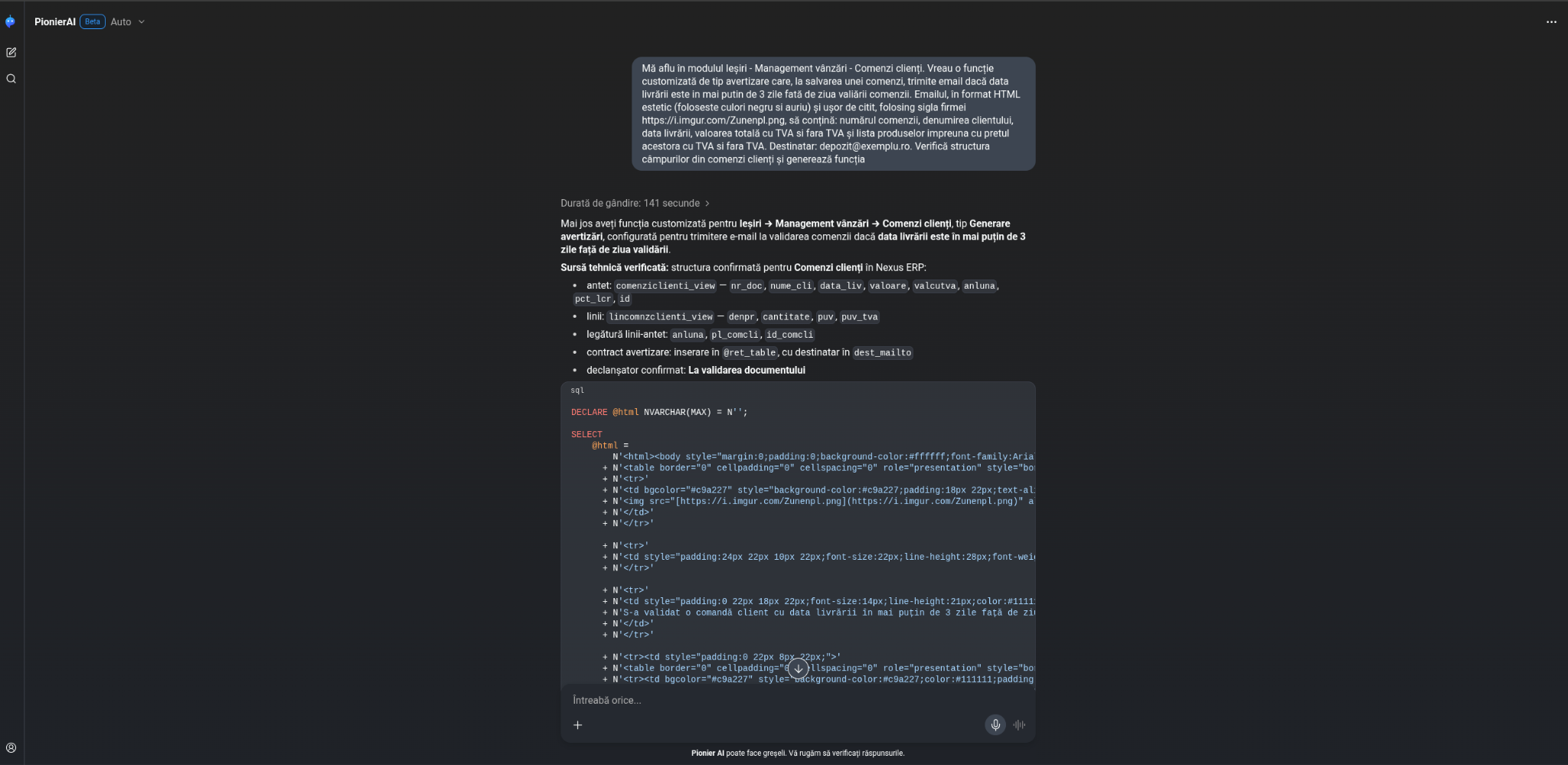
Prompt pentru Pionier AI: Mă aflu în modulul Ieșiri - Management vânzări - Comenzi clienți. Vreau o funcție customizată de tip avertizare care, la salvarea unei comenzi, trimite email dacă data livrării este in mai putin de 3 zile față de ziua validării comenzii. Emailul, în format HTML estetic (foloseste culori negru si auriu) și ușor de citit, folosind sigla firmei https://i.imgur.com/Zunenpl.png, să conțină: numărul comenzii, denumirea clientului, data livrării, valoarea totală cu TVA si fara TVA și lista produselor împreuna cu prețul acestora cu TVA si fara TVA. Destinatar: depozit@exemplu.ro. Verifică structura câmpurilor din comenzi clienți și generează funcția

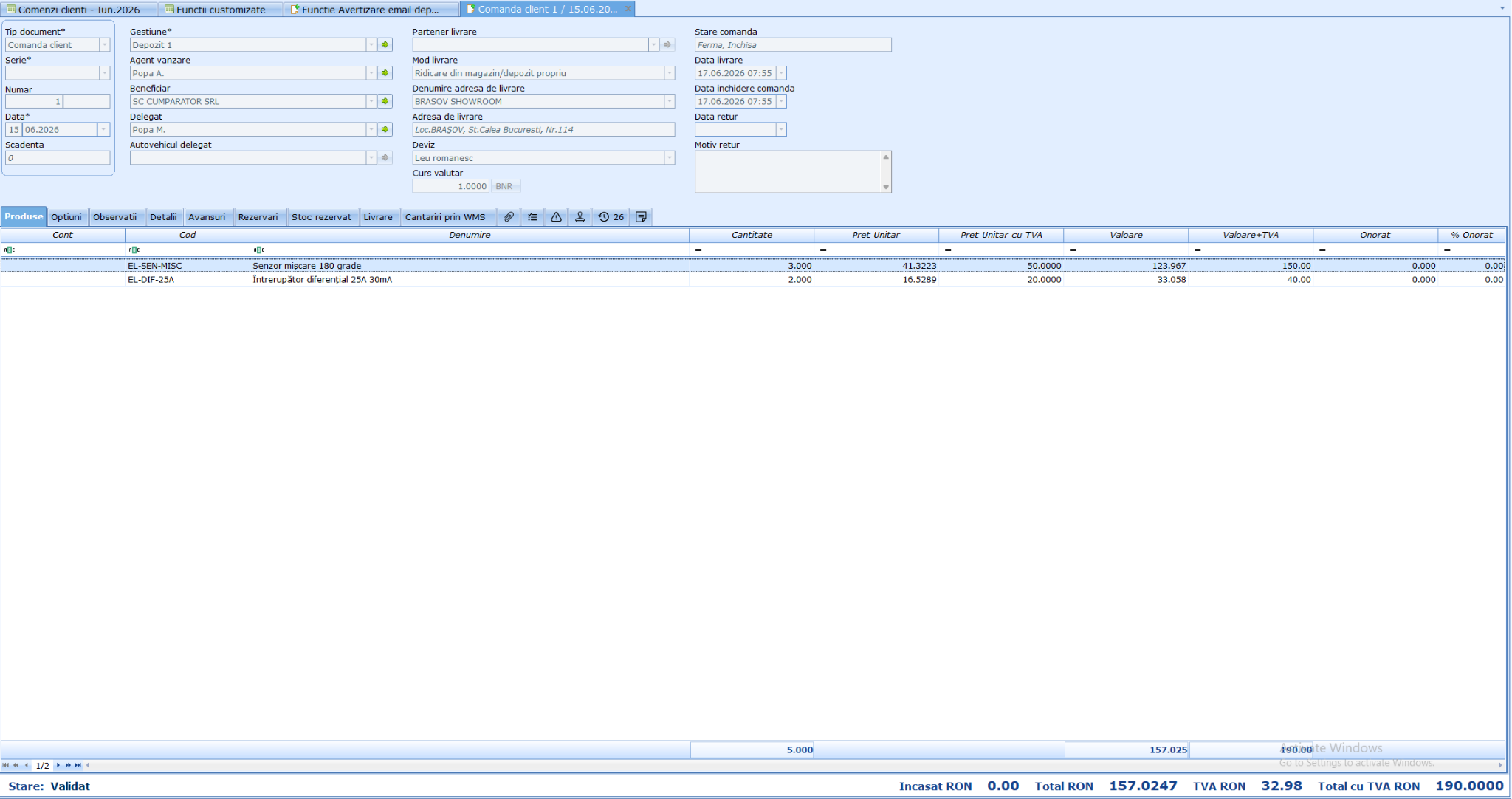
După ce urmăm instrucțiunile oferite de Pionier AI pentru a crea alertă customizată, din modulul Comenzi Clienți adăugăm o comanda cu termen de livrare peste o zi.
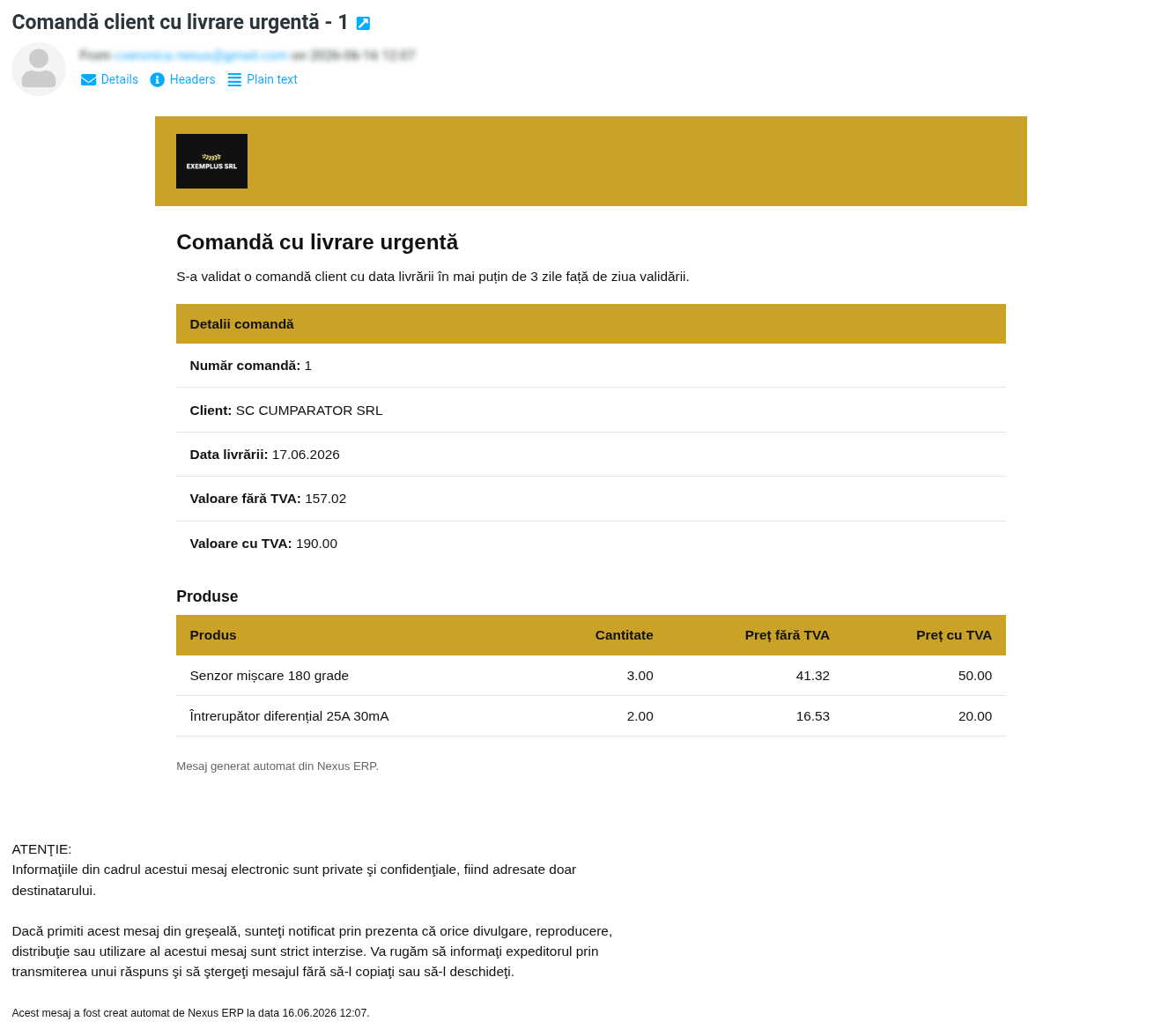
După validarea comenzii, o să primim prin e-mail sumarul comenzii.
Pe parcursul celor 4 scenarii, administratorul SC EXEMPLU SRL a transformat cerințe formulate în limbaj natural în funcții customizate funcționale, câmpuri calculate, o aprobare blocantă și o alertă automată pe e-mail, fără a apela la consultanță externă.